Running Qwen3.6-35B-A3B Locally on a 5090: A llama.cpp + OpenClaw Walkthrough
A practical guide to getting Alibaba’s latest agentic-coding model running on consumer hardware, wiring it into a real agent stack, and not blowing up your VRAM in the process.
Prerequisites
- GPU: NVIDIA card with at least 24 GB VRAM. I used a 5090 (Blackwell, 32 GB); the post’s numbers are sized to that. A 4090 or older works for the same workflow with smaller context budgets.
- OS: Linux. I used RHEL 9; Ubuntu/Debian is the same path.
- CUDA toolkit: 12.8 or newer (13.0 is fine).
- Disk: ~30 GB free for the GGUF download and HF cache, plus a couple GB for the llama.cpp build.
- Tools:
git,cmake, a C++ compiler, CUDA dev headers. Optional:ollamafor embeddings,openclawfor the agent layer.
The Setup
I have a 5090 in my ML rig running qwen3.5:35b, and I’ve tried using it with my OpenClaw setup. It worked for cron jobs — pure batch transforms where one-shot output was good enough — but actual agent work was terrible: tool calls fell apart, multi-turn reasoning drifted, so anything resembling a real loop got routed to the cloud.
Qwen3.6-35B-A3B dropped a few weeks ago — 35B total parameters, 3B active per token, multimodal, 256K native context, and explicitly tuned for agentic coding. Around the same time, on April 4th, Anthropic banned harness traffic from the subscription quota and steered it to “extra usage,” a pay-as-you-go credit pool billed separately. The days of being able to fully utilize your Anthropic subscription are pretty much gone, so it made sense to look for some sort of alternative.
Note: What’s actually new in 3.6 vs. the 3.5 family: better nested-object parsing in tool calls, “thinking preservation” that carries reasoning across turns instead of re-deriving it each time, and noticeably tighter repo-level reasoning. Headline benchmark gains are modest — the wins are concentrated in exactly the failure modes that had broken 3.5 for agent work.
This is the writeup of getting it actually working — including the wrong turns and the things I’d do differently next time.
Why llama.cpp Instead of Ollama?
Since I already had Ollama installed, the obvious path was ollama run qwen3.6:35b-a3b and call it a day. So why not?
Two reasons came up:
Better quantization. The default Ollama tag uses standard Q4_K_M quantization. Unsloth publishes a “Dynamic 2.0” variant called UD-Q4_K_XL that uses the same 4-bit average bit-width but profiles each layer’s sensitivity to quantization and bumps the important ones (attention projections, MoE router weights) to 6- or 8-bit. The result is measurably lower KL divergence from the original BF16 model — meaning the quantized output stays closer to what the uncompressed model would produce. On the kind of multi-step coding tasks this model is designed for, those small quality gains compound.
Direct control. llama.cpp exposes every sampling parameter, every cache-quantization option, every layer-offload knob as a command-line flag. Ollama can technically do most of this through Modelfiles, but it’s an extra layer of indirection.
llama.cpp is also what Ollama uses internally — it’s not a competitor, it’s the engine. Building it from source just means using it directly.
Building llama.cpp for Blackwell
The 5090 is Blackwell, compute capability sm_120. A vanilla llama.cpp build will technically run, but it won’t produce optimized code for the new architecture, leaving real performance on the table.
CUDA toolkit 12.8+ is required for full Blackwell support; my system had 13.0 from the distro, which is fine.
1 2 3 4 5 6 7 8 9 10 11 12 13 | cd ~ git clone https://github.com/ggml-org/llama.cpp cd llama.cpp cmake -B build \ -DGGML_CUDA=ON \ -DCMAKE_CUDA_ARCHITECTURES="120" \ -DBUILD_SHARED_LIBS=OFF cmake --build build --config Release -j --clean-first \ --target llama-cli llama-server llama-mtmd-cli llama-gguf-split cp build/bin/llama-* . |
The key flag is -DCMAKE_CUDA_ARCHITECTURES="120". Without it you get a working but suboptimal binary. If you’re targeting multiple GPUs, you can list several: "89;120" would build for both Ada Lovelace (4090) and Blackwell.
-DBUILD_SHARED_LIBS=OFF produces self-contained binaries — no .so lookups, no library-path issues if you move the executables around. Worth the slightly larger file size.
Running the Server
llama.cpp’s -hf flag pulls models directly from Hugging Face. First run downloads, subsequent runs hit the cache:
1 2 3 4 5 6 7 8 | ./llama.cpp/llama-server \ -hf unsloth/Qwen3.6-35B-A3B-GGUF:UD-Q4_K_XL \ --alias "qwen3.6-35b-a3b" \ --host 0.0.0.0 --port 8001 \ --ctx-size 32768 \ --n-gpu-layers 999 \ --temp 1.0 --top-p 0.95 --top-k 20 \ --min-p 0.0 --presence-penalty 1.5 |
The sampling parameters come from Qwen’s recommended settings for thinking mode. For pure coding tasks, --temp 0.6 --presence-penalty 0.0 produces tighter output.
Once it loads, llama-server exposes an OpenAI-compatible API at http://localhost:8001/v1. You can hit it with curl, point any OpenAI SDK at it, or visit it in a browser for the built-in chat UI.
A Note on Exposing It
--host 0.0.0.0 binds the server to every interface, so anyone on your LAN can hit it without authentication. For a homelab box that’s usually fine, but be deliberate. Two ways to lock it down:
- Firewall. Restrict port 8001 to trusted hosts. RHEL:
sudo firewall-cmd --permanent --add-rich-rule='rule family="ipv4" source address="192.168.1.0/24" port port="8001" protocol="tcp" accept'(then--reload). Ubuntu:sudo ufw allow from 192.168.1.0/24 to any port 8001. - API key. Add
--api-key your-secretto the llama-server command. Clients then needAuthorization: Bearer your-secret, and you set the matchingapiKeyin the OpenClaw config.
If you only need access from the same machine, drop --host 0.0.0.0 and let the default localhost binding do the firewalling for you.
Persistence: systemd
To keep the server running across reboots create a system-level unit that runs as your unprivileged user. Create the file, after that it behaves like any other system service.
1 2 3 4 5 6 7 8 9 10 11 12 13 14 15 16 17 18 19 20 21 22 23 24 25 26 27 28 29 | sudo tee /etc/systemd/system/llama-server.service > /dev/null <<'EOF' [Unit] Description=llama.cpp server (Qwen3.6-35B-A3B) After=network.target [Service] Type=simple User=gpu-user Group=gpu-user WorkingDirectory=/home/gpu-user Environment=HOME=/home/gpu-user ExecStart=/home/gpu-user/llama.cpp/llama-server \ -hf unsloth/Qwen3.6-35B-A3B-GGUF:UD-Q4_K_XL \ --alias qwen3.6-35b-a3b \ --host 0.0.0.0 --port 8001 \ --ctx-size 131072 \ --cache-type-k q8_0 --cache-type-v q8_0 \ --n-gpu-layers 999 \ --temp 1.0 --top-p 0.95 --top-k 20 \ --min-p 0.0 --presence-penalty 1.5 Restart=on-failure RestartSec=10 [Install] WantedBy=multi-user.target EOF sudo systemctl daemon-reload sudo systemctl enable --now llama-server |
Two things changed from the test command earlier: --ctx-size jumped from 32K to 128K, and I added --cache-type-k q8_0 --cache-type-v q8_0 to keep the KV cache from blowing the VRAM budget. The math behind those choices is in the next section.
The User= and Group= directives drop privileges to the regular account. Environment=HOME=... and WorkingDirectory=... matter because system services don’t inherit a user environment, so without them the Hugging Face cache lands somewhere wrong.
Pushing the Context Window
The model supports 256K natively (and 1M with YaRN scaling), but practical context length depends on how much VRAM you have left after loading the weights.
At idle with the 32K config, nvidia-smi showed:
llama-server: 23,914 MiB / 32,607 MiB
Free: ~8.5 GB
That free pool is what you spend on KV cache. KV cache for this model at fp16 runs about 60–65 MiB per 1K tokens. So the math:
| Context | KV precision | Extra VRAM | Total | Verdict |
|---|---|---|---|---|
| 64K | fp16 | +2 GB | ~26 GB | Comfortable |
| 128K | fp16 | +6 GB | ~30 GB | Tight |
| 128K | Q8 | +3 GB | ~27 GB | Sweet spot |
| 256K | Q8 | +7 GB | ~31 GB | Likely OOM |
| 256K | Q4 | +3.5 GB | ~27.5 GB | Fits, quality drops |
128K with Q8 KV cache turned out to be the right call. Q8 is essentially indistinguishable from fp16 in practice; Q4 KV starts producing noticeable degradation on long contexts (the model “forgets” earlier content faster).
Adding --ctx-size 131072 --cache-type-k q8_0 --cache-type-v q8_0 to the service config and restarting bumped usage to about 24.7 GB, leaving roughly 7.7 GB free.
That free headroom matters for the next chapter.
Wiring It Into OpenClaw
OpenClaw treats any OpenAI-compatible endpoint as a custom provider. The chat-model integration is a JSON block in openclaw.json:
1 2 3 4 5 6 7 8 9 10 11 12 13 14 15 16 | "llama-cpp": { "baseUrl": "http://your-server.local:8001/v1", "apiKey": "sk-no-key-required", "api": "openai-completions", "models": [ { "id": "qwen3.6-35b-a3b", "name": "Qwen3.6 35B-A3B (local)", "reasoning": false, "input": ["text"], "cost": { "input": 0, "output": 0, "cacheRead": 0, "cacheWrite": 0 }, "contextWindow": 131072, "maxTokens": 16384 } ] } |
Three things that commonly trip people up:
api: "openai-completions"— notanthropic-messages, notopenai-responses. llama-server uses the standard OpenAI chat-completions schema.baseUrlmust include/v1— without it OpenClaw hits the wrong path and gets 404s.- The model
idmust match exactly whatcurl http://localhost:8001/v1/modelsreturns. Set it via--aliason the server side.
Then point the agent at the model:
1 2 3 4 5 6 7 | "agents": { "defaults": { "model": { "primary": "llama-cpp/qwen3.6-35b-a3b" } } } |
Verify with:
1 | openclaw models status --probe |
That actually pings the endpoint and tests tool calling.
The Embeddings Adventure
OpenClaw needs an embedding model for memory search and retrieval. I’d already been running qwen3-embedding:8b for this on my prior OpenClaw setup — top of the MTEB multilingual leaderboard, family-consistent with the generator, and it had worked fine when it was the only large model on the card. The plan was to just keep using it.
Here’s why that didn’t survive the 3.6 upgrade.
First attempt: 8B Was Too Big
Loading both servers, nvidia-smi showed:
llama-server: 24,776 MiB
ollama:        7,304 MiB
Total:        32,080 / 32,607 MiB
Free: ~520 MiB
That’s not workable. The 8B needed ~7 GB at runtime, llama-server had already taken nearly the rest of the card, and 520 MB isn’t enough headroom to survive fragmentation or a single oversized request.
Second Attempt: 4B Surprised Me
I switched to qwen3-embedding:4b, expecting the runtime footprint to drop to ~3 GB. Instead:
qwen3-embedding:4b 11 GB 37%/63% CPU/GPU 32768
Eleven gigabytes, with 37% of the model offloaded to CPU. That’s catastrophic for embedding throughput — CPU layers are 10–20× slower than GPU.
The culprit was the context window. Ollama allocated a 32K KV cache at fp16:
~36 layers × 2 (K,V) × 2560 hidden × 32768 ctx × 2 bytes ≈ ~12 GB
The weights themselves were only ~2.5 GB at Q4_K_M. The KV cache was bigger than the model by a factor of four. And embeddings don’t need a 32K context — typical inputs are paragraphs or code chunks, a few thousand tokens at most.
Third attempt: nomic-embed-text Just Works
For most retrieval workloads, the 4B and 8B Qwen embeddings are overkill. nomic-embed-text is 137M parameters, ~270 MB on disk, 8K context, 768-dim vectors, and consistently strong on real-world benchmarks.
1 2 | ollama pull nomic-embed-text ollama rm qwen3-embedding:4b |
After the swap:
llama-server: 24,808 MiB
ollama:        1,048 MiB
Total:        25,871 / 32,607 MiB
Free: ~6.7 GB
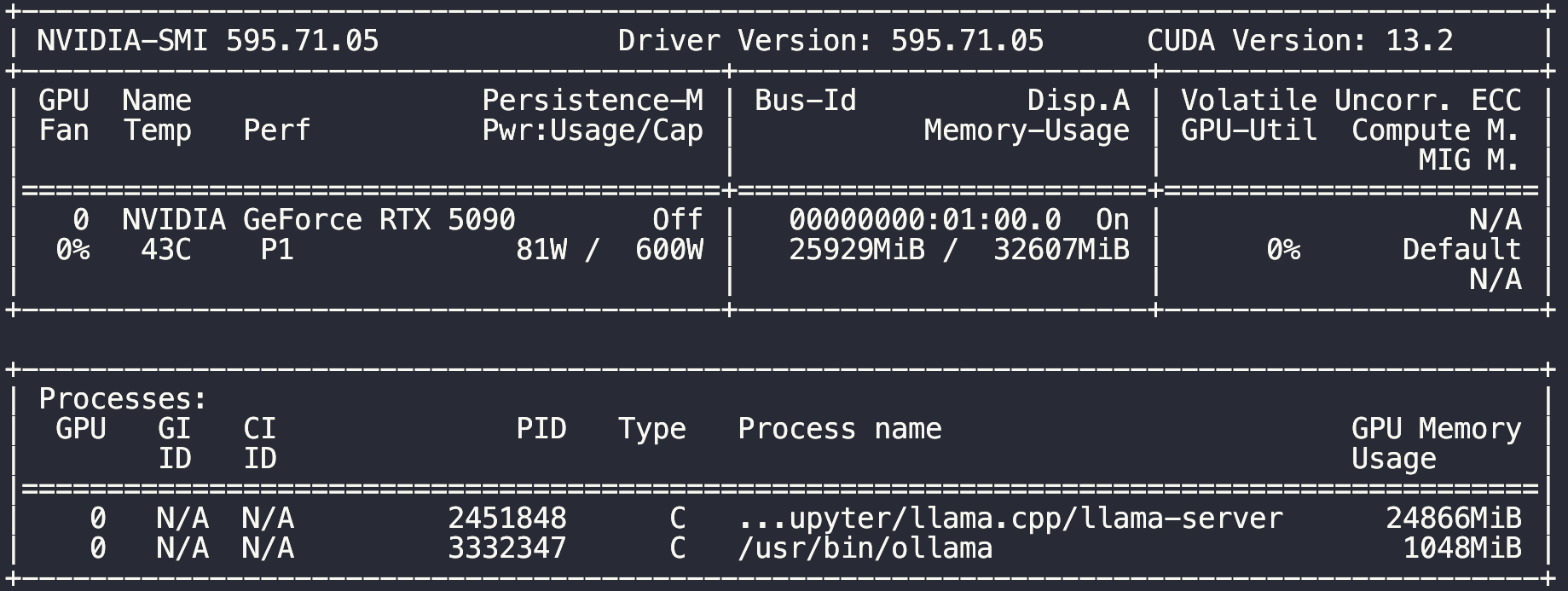
Six gigabytes recovered, fully on GPU, no CPU offloading. Embedding latency back to milliseconds.
The OpenClaw Native-Provider Detail
I initially had the embedding endpoint configured as a generic OpenAI-compatible provider:
1 2 3 4 5 6 7 8 | "memorySearch": { "provider": "openai", "remote": { "baseUrl": "http://your-server.local:11434/v1", "apiKey": "ollama" }, "model": "nomic-embed-text" } |
This works, but you lose something important. nomic-embed-text expects retrieval prefixes — search_query: for queries and search_document: for stored documents. Without these prefixes, retrieval quality drops 5–15% on benchmarks. OpenClaw’s native Ollama provider applies them automatically; the OpenAI-compatible path doesn’t.
The fix:
1 2 3 4 5 6 7 8 9 | "memorySearch": { "provider": "ollama", "remote": { "baseUrl": "http://your-server.local:11434", "apiKey": "ollama-local", "nonBatchConcurrency": 2 }, "model": "nomic-embed-text" } |
Three changes: provider to ollama, drop the /v1 from the base URL (the native path uses /api/embed), and set the API key to the magic marker "ollama-local" that tells OpenClaw “this is local, don’t try to send a real key.”
Reindex When You Switch Embedding Models
This is the one that bites everyone.
Different embedding models produce vectors in different semantic spaces. A 4096-dim vector from Qwen3-Embedding-8B and a 768-dim vector from nomic-embed-text aren’t just different sizes — they encode meaning in completely incompatible ways. Your old vectors are now garbage relative to new query embeddings.
1 | openclaw memory index --force |
This re-embeds every memory with the current model. There’s a known issue where the first attempt times out at 120s with batch disabled — just retry, it usually goes through on the second attempt.
Verify:
1 2 | openclaw memory status --deep openclaw ltm search "something you remember storing" |
You want Provider: ollama, Model: nomic-embed-text, Embeddings: ready, Vector: ready, and actual results from a search.
Final State
                ┌──────────────────┐
                │     OpenClaw     │
                │  (your dev box)  │
                └────────┬─────────┘
                         │
              ┌──────────┴──────────┐
              │                     │
              ▼                     ▼
    your-server.local:8001    your-server.local:11434
    (OpenAI-compatible chat)   (Ollama native embed)
              │                     │
  ┌───────────┴─────────────────────┴───────────┐
  │       RHEL 9 box · RTX 5090 (32 GB)         │
  │                                             │
  │   ┌──────────────────┐   ┌────────────────┐ │
  │   │   llama-server   │   │     ollama     │ │
  │   │ Qwen3.6-35B-A3B  │   │ nomic-embed-   │ │
  │   │ 128K · Q8 KV     │   │     text       │ │
  │   │     24.8 GB      │   │     1.0 GB     │ │
  │   └──────────────────┘   └────────────────┘ │
  │                                             │
  │              free: ~6.7 GB                  │
  └─────────────────────────────────────────────┘
GPU: NVIDIA GeForce RTX 5090 (32 GB)
CUDA: 13.0 (driver 13.2)

Services:
  - llama-server (systemd): Qwen3.6-35B-A3B, 128K context, Q8 KV cache
  - ollama (systemd):       nomic-embed-text, auto-unload after 2m idle

VRAM at idle with both loaded:
  llama-server: 24.8 GB
  ollama:        1.0 GB
  Free:         ~6.7 GB

Endpoints:
  - http://localhost:8001/v1 (OpenAI-compatible chat)
  - http://localhost:11434   (Ollama native, embeddings)

OpenClaw integration:
  - Chat: llama-cpp/qwen3.6-35b-a3b (custom provider, 131K context)
  - Embeddings: ollama provider, nomic-embed-text, native /api/embed
Lessons
Quantization isn’t free, but Unsloth’s dynamic quants get close. The default Q4_K_M is fine for casual use. For a model you’ll lean on for real coding work, the calibrated dynamic quants are worth the manual download.
Build with the right architecture flag. Compiling llama.cpp without -DCMAKE_CUDA_ARCHITECTURES="120" on a Blackwell card gives you a working binary that’s slower than it needs to be, with no warning.
KV cache can dwarf model weights. This was the biggest surprise of the whole exercise. A 4B embedding model at Q4 weighed 2.5 GB, but its KV cache at 32K context weighed 12 GB. Always check --ctx-size on small models — defaults are often wildly oversized for the workload.
VRAM math is unforgiving when you run multiple models. Single-model setups have slack. Multi-model setups force you to actually count bytes. The 7 GB I “saved” by switching from Qwen3-Embedding-8B to nomic-embed-text wasn’t optimization — it was the difference between a stable system and crashes during peak generation.
Switching embedding models requires a full reindex. The vectors are not interchangeable across models. If your retrieval starts returning garbage after a model swap, this is almost certainly why.
Read the integration docs even when “OpenAI-compatible” is offered. Both Ollama and OpenClaw expose OpenAI-compatible paths that work, but their native paths add features — like nomic-embed-text’s required retrieval prefixes — that the generic path skips. Use native when both ends support it.
What’s Next
This setup gives me a local agent backend that’s fast, private, and free at the margin. The 35B-A3B is genuinely capable on coding tasks — repository-level reasoning is noticeably better than the older 30B MoE generation, and the 128K context handles most real codebases without pruning.
The next question is whether to set up reranking. Vector retrieval returns the top-K nearest neighbors by cosine similarity — fast, but coarse. It can’t tell that two documents have similar embeddings for unrelated reasons, and the noise compounds when retrieved chunks land in the agent’s context. A reranker is a small cross-encoder that reads the query and each candidate together and re-scores them; it costs more per pair than the embedding lookup, but typically lifts top-1 accuracy by 10–20% on real workloads.
Qwen3 ships matching rerankers in 0.6B, 4B, and 8B sizes. qwen3-reranker:0.6b on Ollama is the obvious starting point — same provider as the embedder, runs on the same instance, and OpenClaw supports inserting a rerank step between vector retrieval and the agent without changing the embedding pipeline. Roughly: pull the reranker, point a rerank block at the same your-server.local:11434 endpoint, and OpenClaw handles the two-stage retrieval automatically.
With ~6.7 GB free, the 0.6B fits comfortably; the 4B would need a tighter quant or a shorter chat KV cache to make room.
But that’s a project for next weekend.